

Imagine if whenever you are in public, whether going for a walk or ordering food at a restaurant, you spontaneously shouted your name and phone number at everyone you saw. Seems a little crazy, right? Well, if you have an Android device, something similar happens silently whenever you open an app.
There are many ways your data leaks from your device that profile you, and the most prolific way is by distributing your Mobile Advertising ID, or “MAID,” for the purpose of “personalization.” The term personalization is vague and offers few limits about what data should be extracted. While there are benefits to personalized content, I believe the practice undervalues the property we are asked to give up in exchange. This article explains how you can stop your Android device from leaking your valuable data and force the industry to offer better terms for your property.
Before proceeding with the guide below, I would recommend requesting and downloading your Google data first. This process will force Google to delete some of that data, and if you download it first, you will be the only one with some of the knowledge, making your data more valuable.
Step 1: Go to Settings
While on the Home screen, scroll down from the top twice and you will see a cog wheel in the bottom right. Click it to get into your device’s settings.
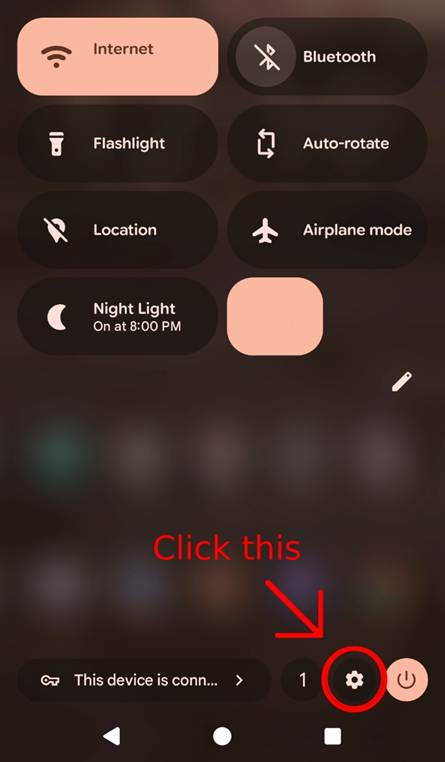
Step 2: Select Security & Privacy settings
Scroll down and click on the Security & privacy option.
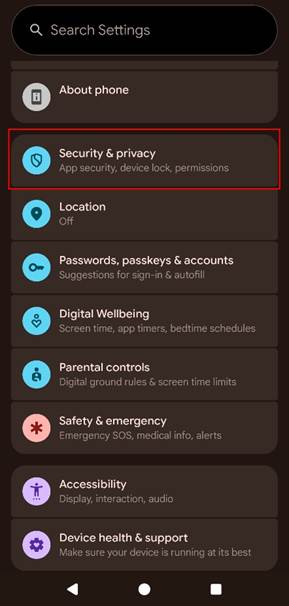
Step 3: Select Privacy Controls
Under the Privacy heading, click the option that says Privacy controls.
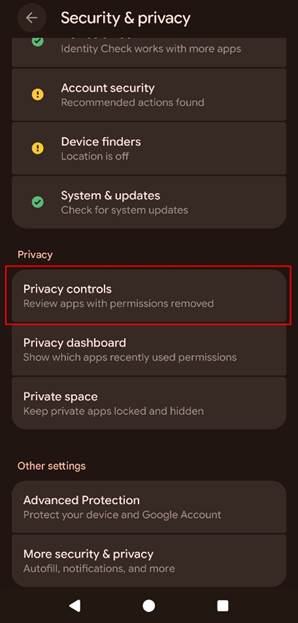
Step 4: Select Ads
Click the Ads options towards the top of the screen.
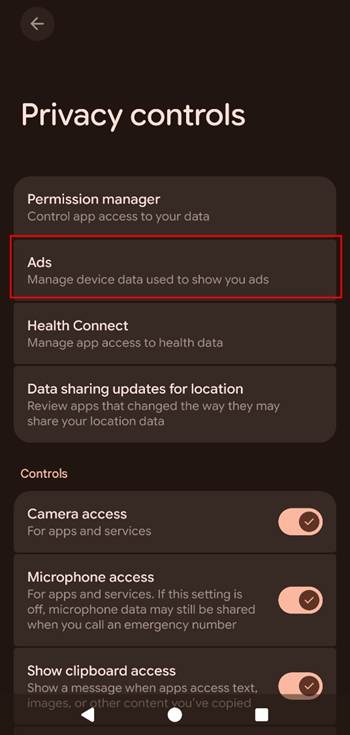
Once you are here, you have a few choices to make on how you want to manage your data profile. While I like the concept of personalized ads and recommendations, I believe Android fails to provide me with enough control, compensation, and transparency to supply my property for this “benefit.” Google and other data aggregators charge money for their data and impose strict controls over how it is used, so why shouldn’t I? Why should I give them a valuable service for free? Until companies are ready to offer fair terms and treat you like an owner, I believe you should be equally protective over your valuable data.
Step 5: Select Delete Advertising ID
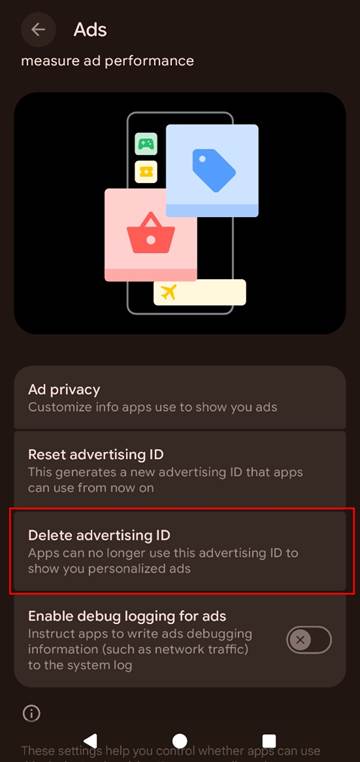
By selecting Delete advertising ID, the MAID assigned to your device is permanently deleted and will cease shouting it to apps whenever you use their services. The deletion makes it more difficult for data aggregators and data brokers to create profiles about you and link your behaviors and activities to the ID without your permission.
Step 6: Select Ad Privacy and Opt Out
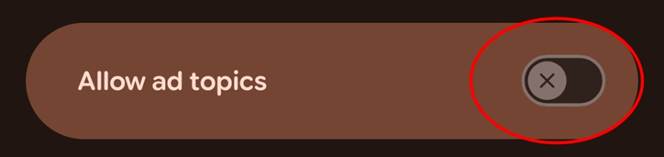
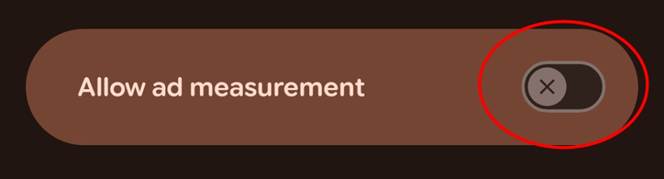
After you’ve deleted your MAID, return to the Ads screen from Step 5 and click Ad privacy. You will find three additional settings that quietly feed your data to data aggregators and data brokers. Ad topics tracks your interests based on app usage, App-suggested ads sends your in-app behaviors to other apps, and Ad measurement provides data buyers with detailed reports about your actions across multiple apps. Together, they are designed to build a profile of you without your meaningful consent.
My criticism is the same as the MAID, and so is the response. This is the type of constructive resistance that must be introduced in the data economy to force companies to offer fair terms. For now, opting out is the only leverage you have to express disapproval. To opt out, click each option and make sure each permission is deselected and looks like this:
Congratulations, you took control of your property and stopped companies from easily harvesting and monetizing your data! My Data Union exists to help you take it further by putting you first in the data economy. Our tools will help you control, monetize, and protect your property. Sign up below to receive early access and our weekly newsletter.

Pingback: What is “Personalization”? - My Data Union